Using the script editor, you can automate the closing of a dialog when a card is moved to a new stage, for example when you close a deal. To configure it, follow the two steps below.
Step 1: Configure the ChatApp bot
First, you need to teach the bot to close the dialog on a command that is not visible to the client.
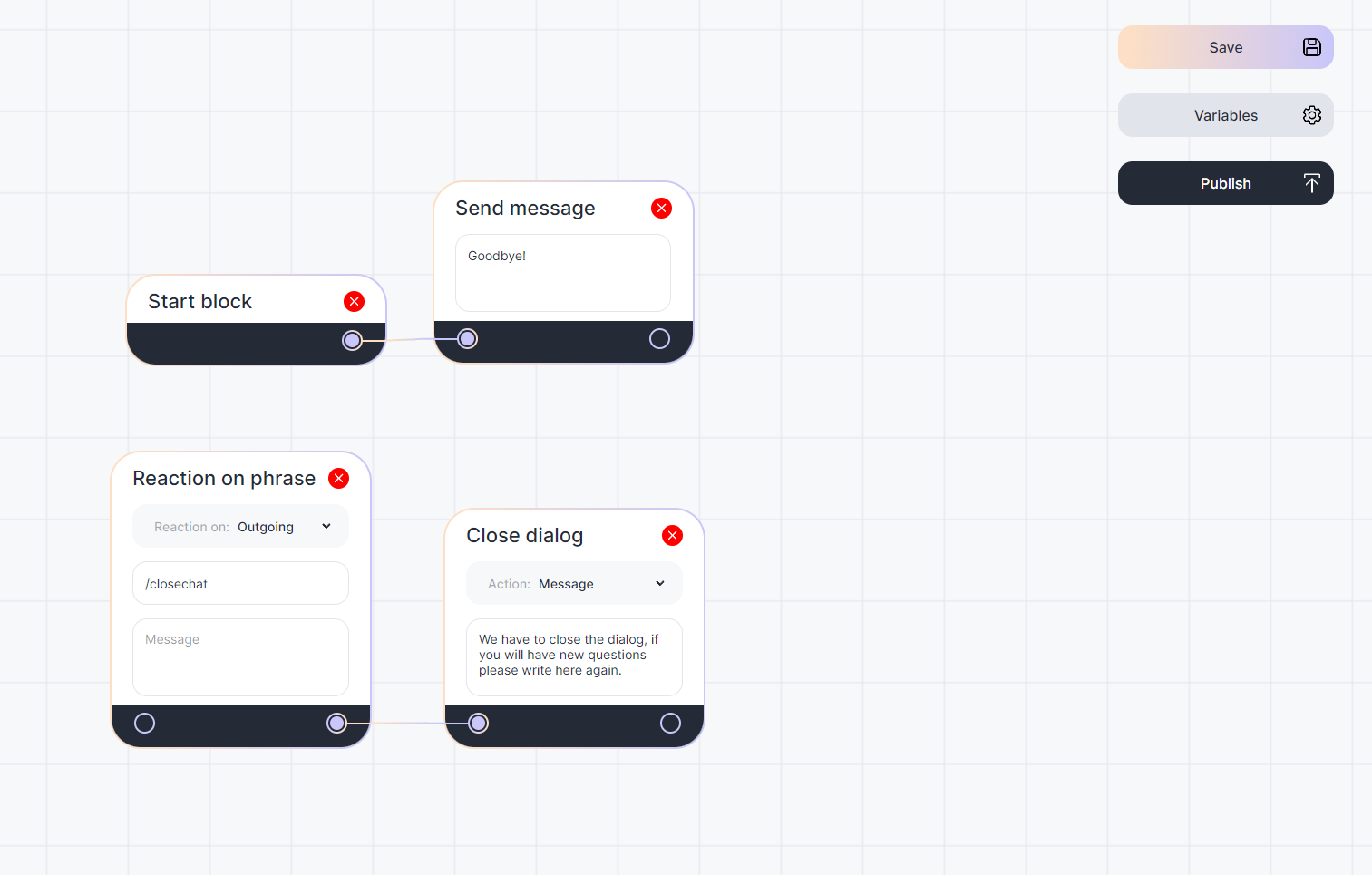
1. Create and activate the bot;
2. Go to the script editor;
3. Add a block “Reaction to a phrase”;
4. Select the reaction to outgoing messages;
5. Enter “/closechat” in the “Key” field;
6. Create a “Close Dialog” block and link it to the “Reaction to Phrase” block;
7. Link the “Start Block” to at least one other block besides the ones you just created. Without this, you won’t be able to save the script: the bot won’t know which block to start with if a client writes to the chat;
8. Give the script a name;
9. Click “Save” and “Publish”.
Now, when you write the command “/closechat” in chat, the bot will close the dialog. The command will not be displayed to the client.
Step 2: Configure Bitrix24
Now let’s teach the Bitrix automation rule to send the /closechat command to the client dialog when a card is moved to the desired stage of the pipeline.
1. Log in to Bitrix24;
2. Open the pipeline where you want to close the dialog when the card is moved;
3. In the kanban at the top right, click “Automation rules”;
4. Select the pipeline stage you want and click on “+”.
5. Create a ChatApp “Send Message” automation rule;
6. In the “Phone” column, type {{Contact: Phone (text)}} so that the automation rule picks up the phone from the card.
7. In the text of the message, write only the /closechat command;
8. In the channels, select the messenger where you want to send the message.
Now when you move the card to the stage with the automation rule, it will write the command “/closechat” in the chat. The client will not see the command, and the ChatApp bot will close the dialog.

If you still have questions, we suggest watching the tutorial.
