Contact support:
    Contact support
    Free Trial Log in
    Select country or language

    How to set up automation

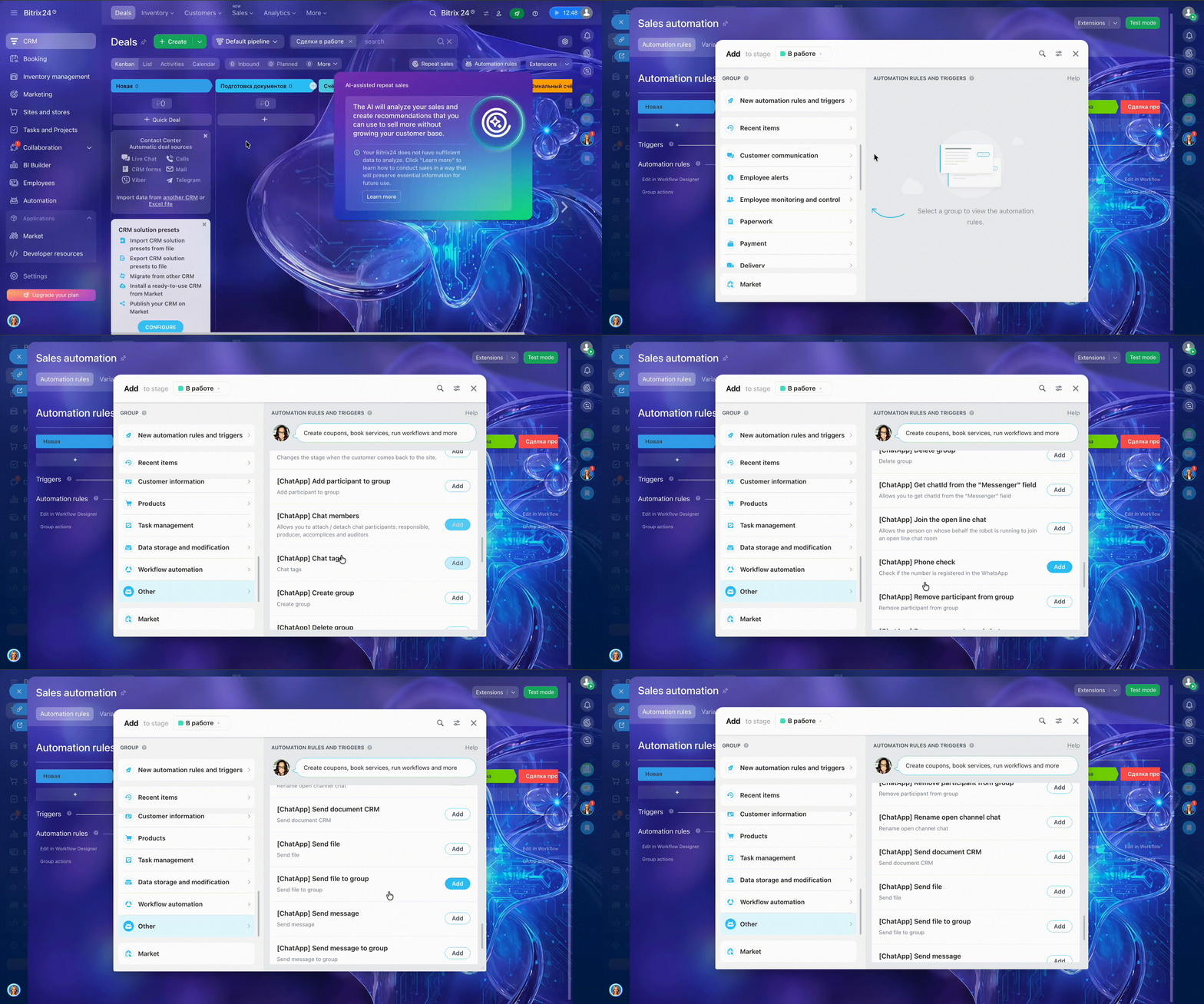
    How to add a ChatApp robot:

    Step 1. Go to the “Robots” section in the required CRM pipeline.
    Step 2. Click “+” on the stage where the robot should be triggered.
    Step 3. Scroll down the left menu and select “Other robots”.
    Step 4. Find robots whose names start with ChatApp for WhatsApp, Telegram, or Viber.

    Robots for private client conversations

    • Send message
    • Send CRM document
    • Send file
    • Phone number verification
    • Chat labels
    • Rename Open Line chat
    • Join Open Line chat
    • Get chatId from the “Messenger” field

    Group robots:

    • Create group
    • Delete group
    • Send message to group
    • Send file to group
    • Add participant to group
    • Remove participant from group
    • Chat participants

    Template message robots:

    • Send WABA template message
    • Send WACA template message