

Retrieve the ChatId from the ‘Messenger’ field
The robot retrieves chat data from the “Messenger” field. This field stores the client’s chat identifier in Open Lines.
How to add the ChatApp robot:
Step 1. Go to the “Robots” section in the required CRM funnel.
Step 2. On the stage where the robot should trigger, click “+”.
Step 3. In the left-hand list, scroll down and open the “Other robots” section.
Step 4. Select the robot [ChatApp for WhatsApp, Telegram, Viber] — “Get ChatId from Messenger field”.
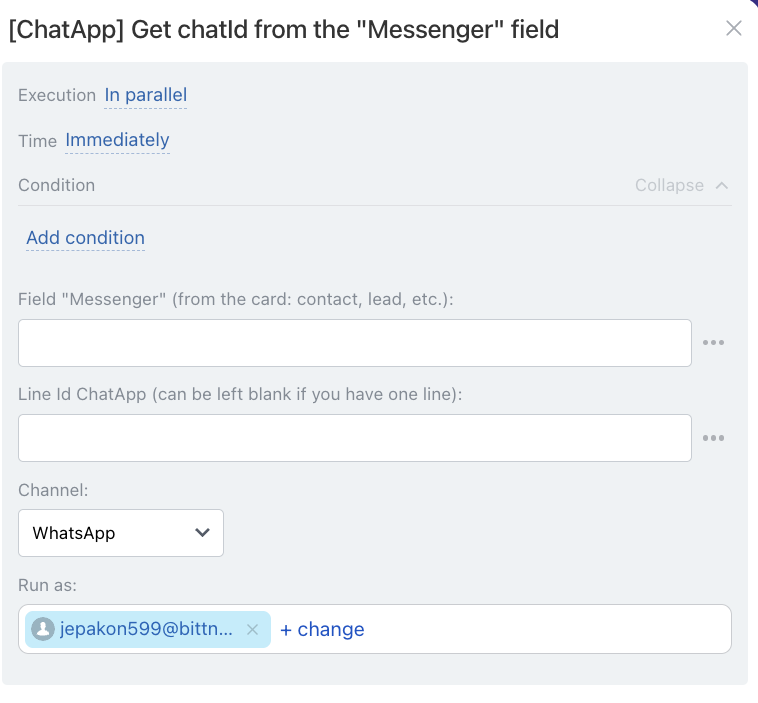
• Independently of other robots — starts immediately (default).
• After the previous robot — starts only after previously configured robots on this stage have completed.
When — the robot trigger moment:
• Immediately — when the card moves to the stage (default).
• After time — delayed start (set interval).
Conditionally — additional conditions for robot execution (if needed).
If the condition is met — the robot will run. If not — the robot will not run.
• for lead — {{Messenger (text)}}
• for deal — {{Contact: Messenger (text)}}
In the “Channel” field select the communication channel from the line specified in the “Line ID” field.
